How to move and edit bookings
On the grid
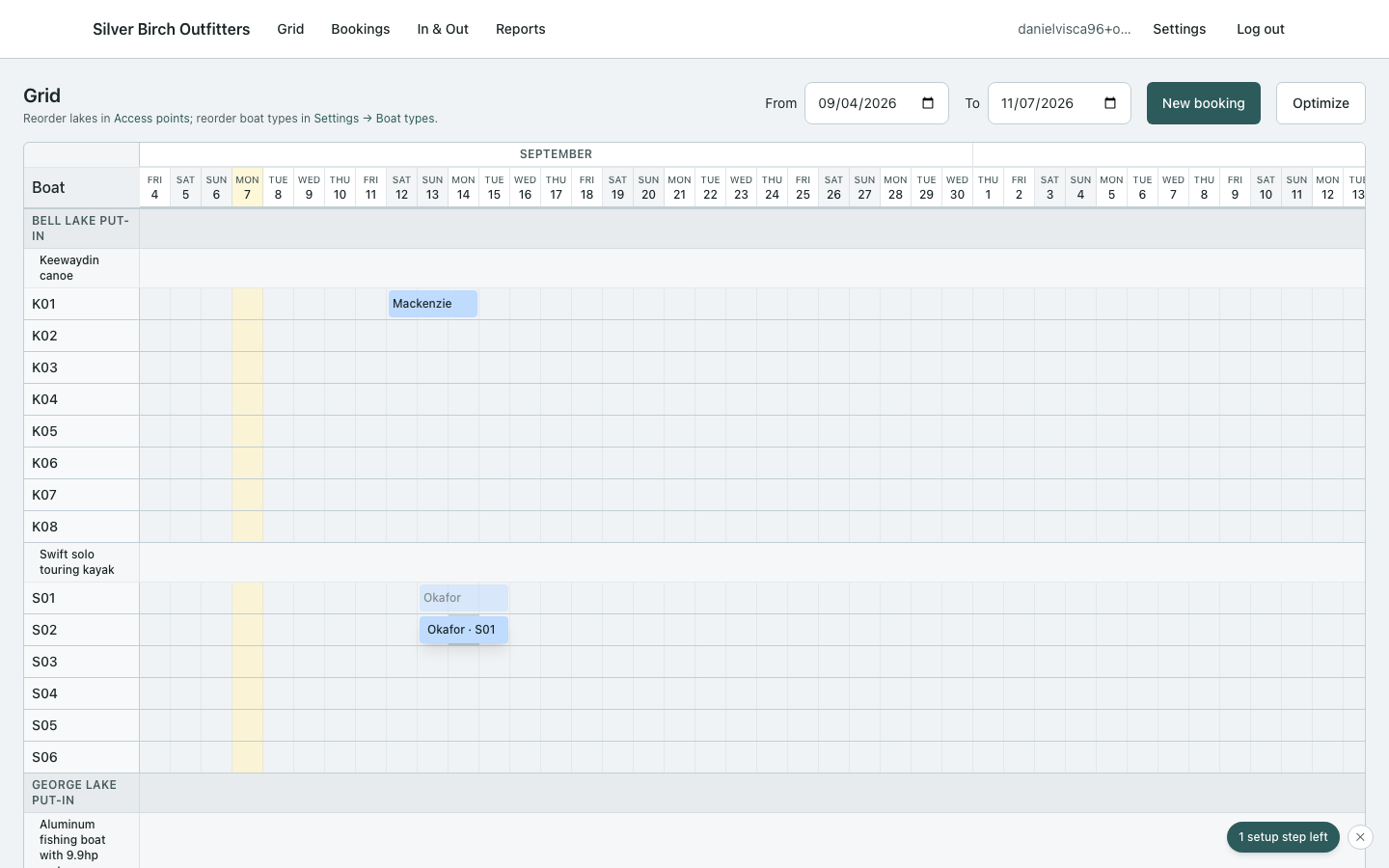
- Drag a block to a new start date on the same boat, or onto another boat.
- Drag the left edge to move the start day, or the right edge to move the end — same boat, new length.
- Diagonal moves (new boat + new dates) patch both together.
- With the edit panel open, Shift-click another boat’s empty day to add that hull to this trip. Shift-click it again to take it off. (An active trip will not change hulls this way — dates and boats stay locked until you return it.)
- If gear inventory blocks the move, the amber banner on the grid says why. Use Force move anyway when you mean it — the booking stays marked needs attention. That is not a Sync conflict; Needs attention in the nav / Sync list is only for offline v2.
In the side panel
- Click the block → Edit booking for the full form.
- On an active trip, dates, boats, and locations stay locked. Party size, contact, notes, and extra fields still save.
- Close dismisses the panel (does not cancel the trip).
- Cancel booking voids it after confirm.
Ask can fill this same panel from the grid instead of opening the full booking page. See How to take a booking with Ask. On edit, booked hulls stay ticked; the recommendation is opt-in.