How to optimize the grid
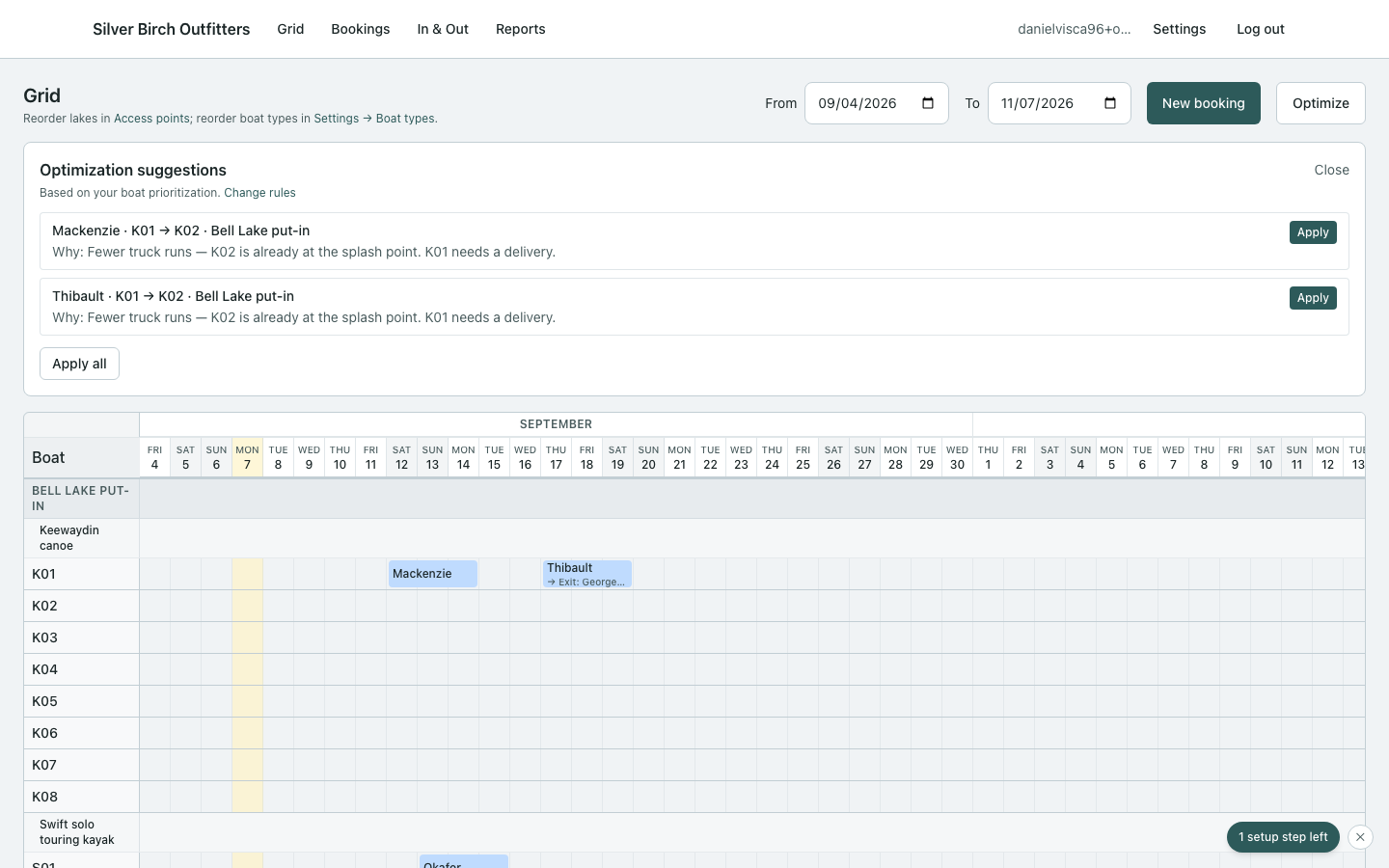
The optimizer proposes hull moves that cut trucking. You apply; you can undo.
Steps
- Open the grid for the range you care about.
- Click Optimize. Review suggestions (Why line + warnings).
- Hover a row to ghost the move on the grid.
- Apply one or Apply all.
- Sticky bar: outcome summary, Undo, Done, optional Play moves.
Tips
- Viewport stays put after apply — wow is the outcome bar, not the camera.
- Disagree with a suggestion? Fix boat prioritization, then optimize again.
If Overnight truck pass is on, clean truck-saving swaps on tomorrow-or-later trips may already be applied when you open the board. Revert still undoes that run. See How the overnight truck pass works.
Optional trucks and trailers (Settings → Trucks & trailers) tell Optimize how many boats fit on each hitch. Five boats on one squeezed trailer beats a leftover 1-boat run. Squeeze only happens when it avoids another trip; eight boats at a comfortable four still go as two loads. Different trailer sizes pack largest first. Optimize still does not route the truck.
Optimize will not take a boat off a trip someone already paid for. That override lives on the new-booking form when a trip otherwise cannot go.
Next
How to set boat prioritization · How to set trucks and trailers · How the overnight truck pass works